---
title: What is a workflow?
description: Streamline your work with Workflows—track progress, collaborate across sessions, get sign-offs, manage action items, and ensure nothing falls through the cracks!
---
[Skip to content](https://support.weeversoftware.com/workflows#main-content)
[Submit a Support Issue](https://support.weeversoftware.com/kb-tickets/new?hsLang=en)
[](http://weeversoftware.com/)
Open main navigation
Close main navigation
- [Submit a Support Issue](https://support.weeversoftware.com/kb-tickets/new)
How can we help you?
- There are no suggestions because the search field is empty.
1. [Weever Knowledge Base](https://support.weeversoftware.com/?hsLang=en)
2. [Weever Forms](https://support.weeversoftware.com/weever-forms?hsLang=en)
3. [Action Tracker & Workflows](https://support.weeversoftware.com/weever-forms?hsLang=en#action-tracker-workflows)
# What is a workflow?
## Streamline your work with Workflows—track progress, collaborate across sessions, get sign-offs, manage action items, and ensure nothing falls through the cracks!
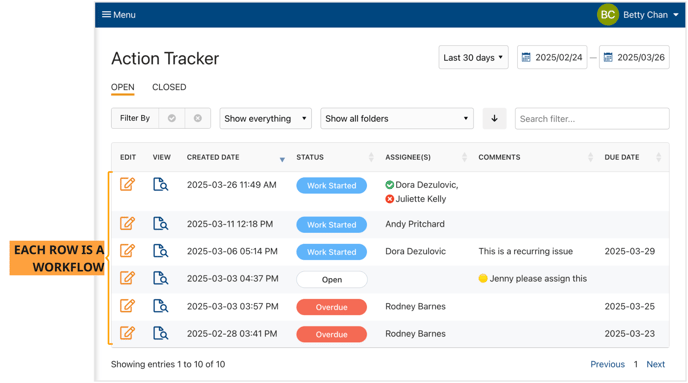
A Workflow is a type of form in Weever that once it's submitted is available on the [Action Tracker page](https://support.weeverapps.com/action-tracker-page?hsLang=en) so you can keep working on that form. You can assign the workflows (or the action items in the workflow), update the status, set a due date, or add comments.
This was previously called a "Ticket" in Weever.
[](https://weeverapps.com)
Weever Knowledge Base
Copyright © 2026, Weever