What is Weever Radar?
Weever Radar is an operational intelligence tool for manufacturing supervisors, managers, and plant leaders, powered by AI.
It turns the frontline data captured within Weever into immediate answers, insights, and recommendations you can act on. Instead of searching through submissions or building reports, you type a question in plain language and Radar answers in seconds using your site's live data. Radar is read-only. It reads your data, but it never creates, edits or deletes anything.
Note: Weever Radar is available for Supervisors and Administrators-level users only.
Two ways to use Weever Radar
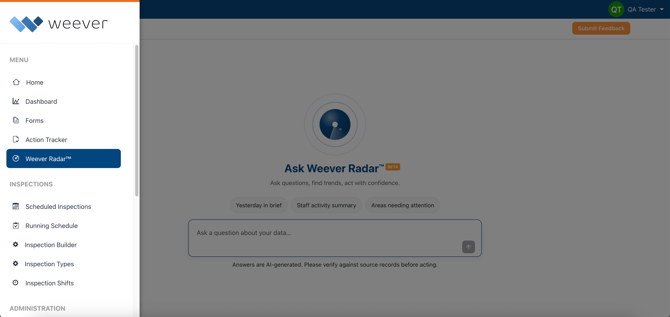
1. Site Radar
Go to Menu > Weever Radar to ask questions across all forms on your site, including inspection forms. Use it to compare forms, spot trends across areas, or check overall Action Tracker and inspection status. For example: Analyze all CIL inspections in the past 6 months. Spot the most common failures and suggest improvements.
2. Form Radar
Go to Form Reports, find the form you need, and click Ask Weever Radar. Radar answers questions about that form's submissions only, which keeps answers focused. Use it for a deep dive into a single checklist or audit. For example: What forklift has been causing me the most issues this current year? Summarize all problems with it.
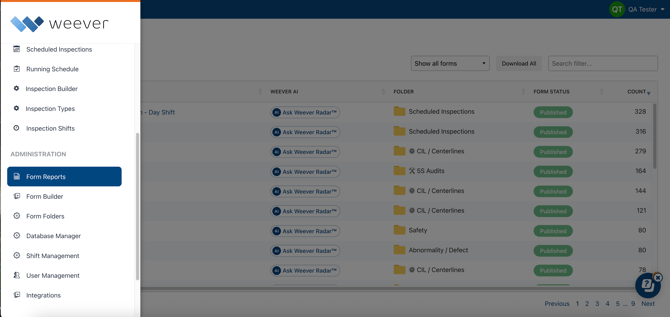
Tip: In Form Radar, Radar can't see other forms. If your question covers more than one form, use Site Radar instead.
What can I ask Weever Radar?
Weever Radar runs on the data your frontline teams already record in Weever: safety observations, sanitation sign-offs, 5S audits, AM checks, quality inspections and corrective actions.
Here are some example questions you can try, by department:
| Safety | Quality | Sanitation | 5S & Continuous Improvement | Maintenance | Production |
| Based on my safety incidents in the past 90 days, recommend next month's safety campaign. | What was the pass rate on quality inspections by line last month? | What area of my plant misses sanitation inspections and what is the frequency? | How have our 5S audit results trended by area over the last 6 months? | Analyze failures in AM checks including Centerlines, CILs, and Abnormality reporting and recommend improvements to my inspections. | Summarize and prioritize all open actions and provide suggestions on next steps for open actions. |
| What are the most common themes in this quarter's safety observations? | Summarize my site's quality check failures and highlight opportunities to improve my checks. | Which areas have overdue sanitation inspections today? | How many actions from audit events are still open? | Pareto which assets appear most often in Abnormality reporting over the last 6 months. | How did each shift perform on scheduled inspection completion last week? |
Make sure you adjust them to the names of your own forms, lines and areas.
Tips
- Add a time frame - "last week", "this month" or a date range gives more focused answers.
- Be specific - include the line, asset, shift or person you're interested in.
- Use your team's names - refer to forms and areas the way they're named in Weever.
- Ask follow-up questions - start broad ("How many Near Misses this month?"), then narrow down ("Which area had the most?").
FAQ
- Why I can't see Weever Radar? Weever Radar is an add-on. If you'd like to enable it for your site, please contact your Customer Success Manager.
- Can Radar create or close actions for me? No. Radar is read-only. It can tell you about actions, but it can't change them.
- Is the data up to date? Yes. Radar reads your live data in Weever.
- Why can't Radar find a submission I know exists? Check that you're using Site Radar, or Form Radar on the right form. If the submission or form was deleted, Radar can't see it.
- Can Radar tell me who has access to a form? No. Users and permissions are outside Radar's scope. Please contact your site admin.