---
title: How can I send keep the original submitter updated on workflow progress?
description: Stay up to date with your Weever submissions with handy email notifications.
---
[Skip to content](https://support.weeversoftware.com/original-submitter-notifications#main-content)
[Submit a Support Issue](https://support.weeversoftware.com/kb-tickets/new?hsLang=en)
[](http://weeversoftware.com/)
Open main navigation
Close main navigation
- [Submit a Support Issue](https://support.weeversoftware.com/kb-tickets/new)
How can we help you?
- There are no suggestions because the search field is empty.
1. [Weever Knowledge Base](https://support.weeversoftware.com/?hsLang=en)
2. [Weever Forms](https://support.weeversoftware.com/weever-forms?hsLang=en)
3. [Form Builder](https://support.weeversoftware.com/weever-forms?hsLang=en#form-builder)
# How can I send keep the original submitter updated on workflow progress?
## Stay up to date with your Weever submissions with handy email notifications.
#### [New to Weever? See how Weever helps manufacturers digitize and automate frontline operations →](https://weeversoftware.com)
Enable workflow notifications so your submitting users can be notified when their submission is updated.
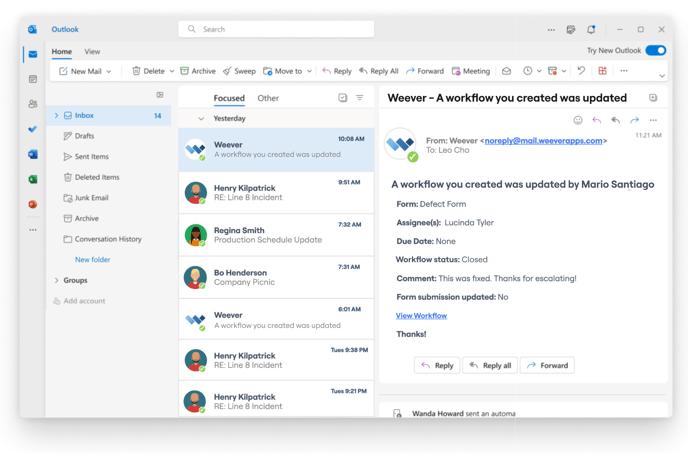
Email notifications will be sent to original submitter when a form is updated from the Action Tracker page. This includes updates to the submission data, as well as updates to the workflow properties including Status, Assignee, Due Date, & Comments.
**How to enable this feature on your form**
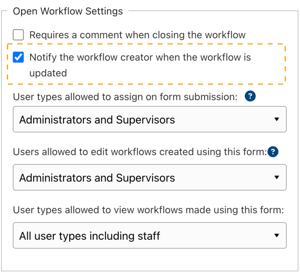
Enable submitter notifications in the Form Settings section of Form Builder by selecting the "Notify the workflow creator when the workflow is updated" option.
**How to enable or disable these emails**
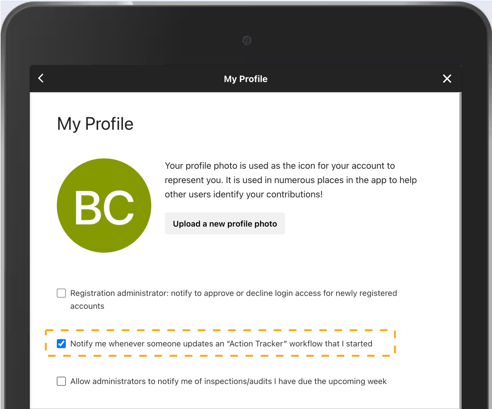
Enable or disable these notification emails in your profile by tapping the "Notify me whenever someone updates a workflow that I created" option.
**Note!** - This functionality only notifies the logged in user, not users in "Reported By" fields.
#### Interested in learning more about Weever? [Book a demo](https://weeversoftware.com/book-a-demo)
[](https://weeverapps.com)
Weever Knowledge Base
Copyright © 2026, Weever