---
title: What do the date column headers in Power BI mean?
description: Learn about how Power BI displays the date & times your forms were submitted or your workflows were edited.
---
[Skip to content](https://support.weeversoftware.com/date-columns-power-bi#main-content)
[Submit a Support Issue](https://support.weeversoftware.com/kb-tickets/new?hsLang=en)
[](http://weeversoftware.com/)
Open main navigation
Close main navigation
- [Submit a Support Issue](https://support.weeversoftware.com/kb-tickets/new)
How can we help you?
- There are no suggestions because the search field is empty.
1. [Weever Knowledge Base](https://support.weeversoftware.com/?hsLang=en)
2. [Weever Forms](https://support.weeversoftware.com/weever-forms?hsLang=en)
3. [Power BI Integration](https://support.weeversoftware.com/weever-forms?hsLang=en#power-bi-integration)
# What do the date column headers in Power BI mean?
## Learn about how Power BI displays the date & times your forms were submitted or your workflows were edited.
Weever time stamps when forms are submitted, as well as when workflow properties are edited, or submission data is edited. Learn which columns in Power Bi displays these time stamps below:
Workflows are called "tickets" in Weever's OData tables
### When was the form was submitted ?
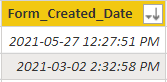
This is the date the original form submission was made regardless of if this form is a Workflow form. This is displayed in Power Bi in the **Form\_Created\_Date** column.
### When were the workflow properties edited?
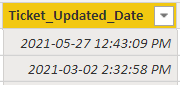
This includes when the workflow status, assignee, due date, or comments where added or edited. This column will show the last date and time these properties were edited. This is displayed in Power Bi in the **Ticket\_Updated\_Date** column.
### When was the submission data edited?
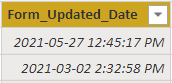
This includes when any edits were made to a submission while in [Action Tracker](https://support.weeverapps.com/inprogress?hsLang=en) by tapping Edit beside a workflow editing the data and re-submitting the form.This will show the most recent date and time the form submission was edited. This is displayed as **Form\_Updated\_Date** in Power BI.
[](https://weeverapps.com)
Weever Knowledge Base
Copyright © 2026, Weever