
Bulk Action Tracker Status Change
The new Bulk Update option for the Action Tracker page lets you update the status of multiple workflows at once. Instead of changing status’s one by one, select several action items together and move them all to a new status in a single step.
Note:
Only Admin level users have access to this feature.
How it works
1. Filtering
-
Filter the page using any combination of;
- date,
- action item status
- folder
- search bar
-
Whichever forms you have filtered will have the status applied. (Max 1000 forms per bulk edit)
.png?width=552&height=200&name=Bulk%20Action%20Tracker%20Status%20Doc%20V3%20(1).png)
2. Open Bulk Update Window
Once your filters are set, select the Bulk Update button.
.png?width=339&height=82&name=Bulk%20Action%20Tracker%20Status%20Doc%20V3%20(2).png)
3. Select and Apply Status
-
The Bulk Status pop up will display the number of actions being edited.
-
Select the appropriate status. The Closed and Rejected options trigger a required closing comment to be documented.
-
Select the Update Action Items button to apply the status to all the workflows included.
.png?width=556&height=574&name=Bulk%20Action%20Tracker%20Status%20Doc%20V3%20(3).png)
Pro Tip
-
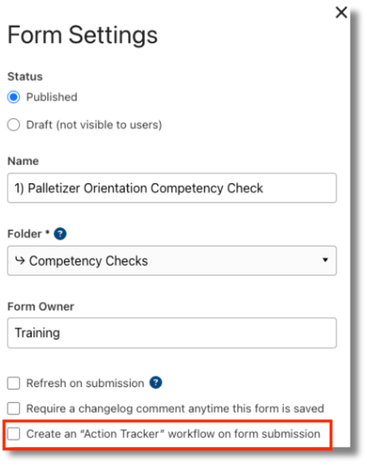
Review your Forms that have the ‘Create an “Action Tracker” workflow on form submission.’ option enabled in the Form Settings.
-
Disabling this option for Forms that do not require actionable follow up will help keep your action list clean and focused moving forward.
-
Disable this via the FormSettings by unchecking the option.
And that's it!
Now you know how to bulk update action status and keep you action tracker list focused and functional!