---
title: How do I utilize the Audit Trail feature?
description: Learn how to utilize the Audit Trail feature in Weever!
---
[Skip to content](https://support.weeversoftware.com/audit-trail#main-content)
[Submit a Support Issue](https://support.weeversoftware.com/kb-tickets/new?hsLang=en)
[](http://weeversoftware.com/)
Open main navigation
Close main navigation
- [Submit a Support Issue](https://support.weeversoftware.com/kb-tickets/new)
How can we help you?
- There are no suggestions because the search field is empty.
1. [Weever Knowledge Base](https://support.weeversoftware.com/?hsLang=en)
2. [Weever Forms](https://support.weeversoftware.com/weever-forms?hsLang=en)
3. [Form Builder](https://support.weeversoftware.com/weever-forms?hsLang=en#form-builder)
# How do I utilize the Audit Trail feature?
## Learn how to use the audit trail feature and how to set up your form builder change log.
[Audit Trail for Form Submissions](https://support.weeversoftware.com/audit-trail#form-reports)
[Audit Trail for Form Builder Changes](https://support.weeversoftware.com/audit-trail#form-builder)
### Form Reports Page
The Form Reports page contains the audit trail for all form submissions made within your site, including Inspection forms as well.
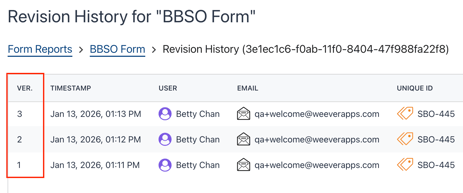
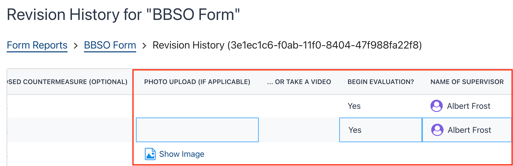
This audit trail keeps track of each saved version of a submission and lists the changes made between version by highlighting fields in blue. You can find this information by:
- Navigating to the Form Reports page
- Selecting the Form you'd like to view audit history for
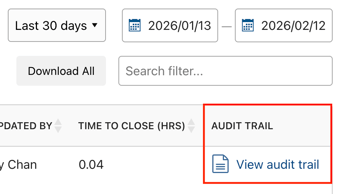
- Scroll to the far right of the page and select '**View audit trail**' on the submission you'd like to review
### Form Builder Page
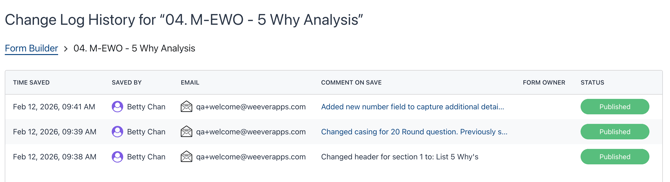
The Form Builder page offers an audit change log to list updates that were made to a form. It will list who made the change, when and a comment left by the user as to what changes were made.
**Enabling the Change Log:** *(**This is recommended to only be done once a form is fully built**)*
- Begin by selecting **Edit** on a form you'd like to enable the change log for
- Go into the **Form Settings** for that form
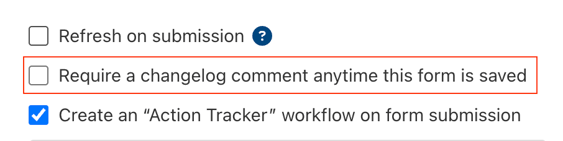
- Check the box to enable the change log comment when the form is saved
**Viewing the Change Log:**
- On the Form Builder page, scroll to the far right
- Select '**View changelog**' for the form you'd like to review
- Scroll through the list to review all updates made to this form since the change log was enabled
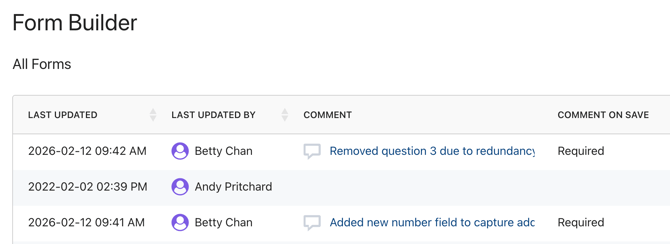
- You can also see the last made comment and whether or not the change log is enabled on the form directly on the page as well
- Use the columns for **Comment** and **Comment on Save** status
[](https://weeverapps.com)
Weever Knowledge Base
Copyright © 2026, Weever